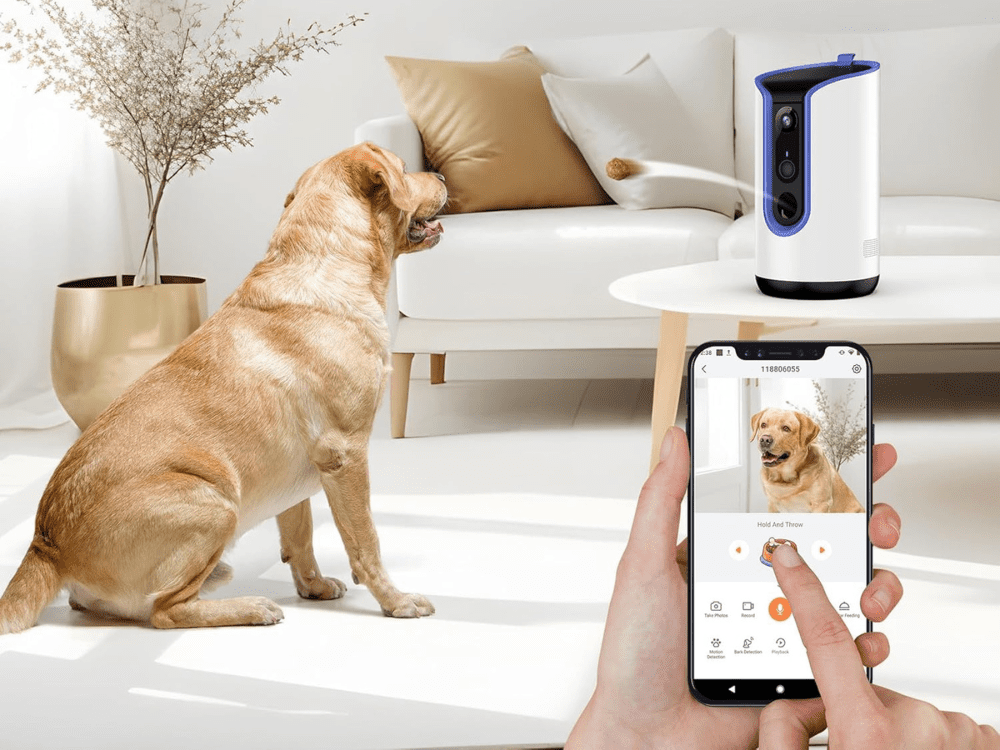



Ever wondered what your furry friend does when you’re not home? The Furbo pet camera answered that question for me—and opened up a whole new world of pet parenting.
Priced at $199 on Amazon and Chewy, this treat-dispensing dog camera offers more than just basic monitoring. Actually, it’s packed with features that caught my attention: it tosses treats at your command, lets you talk to your pet through a two-way mic, and even alerts you when your dog is barking. Beyond that, the companion app uses AI to track your pet’s behavior throughout the day.
However, is this high-tech pet surveillance worth the investment? Some might wonder if it’s just an expensive pet security camera, especially when there are 23 other options on the market. Throughout this review, I’ll share my unfiltered experience as a busy pet parent and help you decide if the Furbo deserves a spot in your home.
Furbo Pet Camera Setup and First Impressions
Unboxing and Design Esthetics
Opening the Furbo box reveals a sleek, modern device that strikes a balance between technology and home decor. The first thing I noticed was its elegant cylindrical shape topped with an eco-friendly natural bamboo lid. This thoughtful design element helps the camera blend seamlessly into most home environments, unlike many tech-focused pet products that stick out like a sore thumb.
Beneath the stylish exterior lies some impressive hardware: a full HD camera with automatic night vision capability, integrated barking sensor, built-in microphone and speaker for two-way communication. The newer 360° model offers complete room coverage through its rotating camera—a significant upgrade from the fixed-position original version.
Initial Setup and App Pairing
Setting up the Furbo proved remarkably straightforward. You’ll need three things to get started: a smartphone, the Furbo camera itself, and a 2.4GHz WiFi connection. The setup process begins by downloading the Furbo app from either the App Store or Google Play Store, depending on your device.
After plugging in the camera, you’ll notice indicator lights that signal readiness for pairing. For newer 360° models, look for a blinking yellow light, while older versions display a solid green light. The app guides you through creating an account (or signing in if you already have one), selecting your device type, and connecting to your home WiFi network.
Throughout my setup experience, the app provided clear instructions with helpful visuals. The entire process—from unboxing to fully functioning—took less than 25 minutes, which feels refreshingly efficient compared to other smart home devices I’ve installed.
Placement Tips for Best Coverage
Finding the ideal spot for your Furbo significantly impacts its effectiveness. For optimal coverage, place the device 22-45 inches above the floor based on your pet’s height. This elevation allows the camera to capture your pet’s activities clearly while keeping the treat dispenser at an accessible height.
Additionally, position the Furbo away from direct sunlight and moisture to protect its electronic components. Since the WiFi antenna is located on the right side of the device, placing it approximately 5 feet away on the left or front side of your router ensures better connectivity.
For households with particularly enthusiastic pets, the three 3M double-sided tapes on the bottom provide welcome stability, preventing knock-overs and treat theft attempts. Furthermore, ensuring the treat dispenser faces an open area prevents treats from getting lost behind furniture.
Core Features That Make Furbo Stand Out
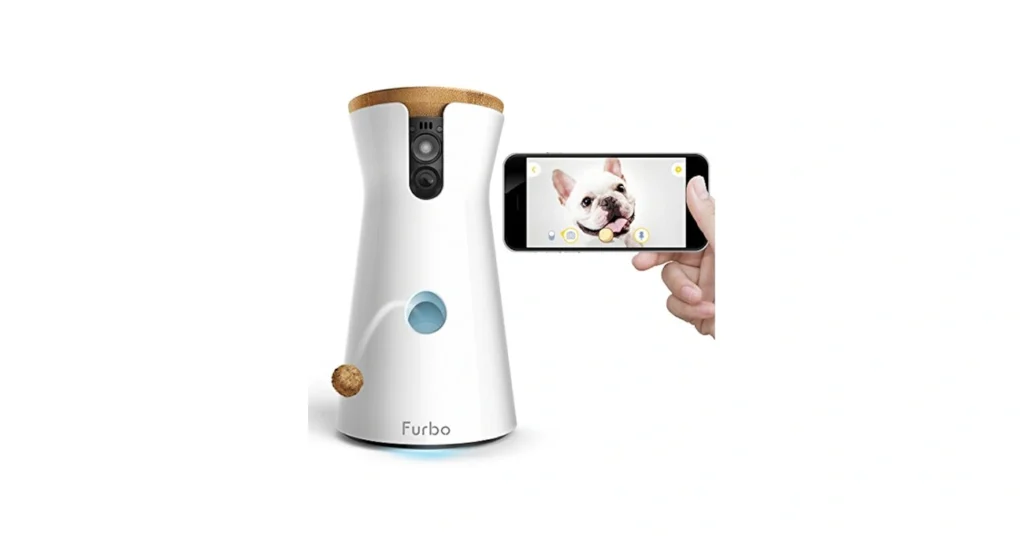
What truly sets the Furbo apart from standard pet monitoring devices are its specialized features designed with both pets and owners in mind.
Treat Tossing: How It Works and Pet Reactions
The treat-tossing mechanism is undoubtedly Furbo’s most distinctive feature. With a capacity for up to 100 treats, this functionality turns remote monitoring into an interactive experience. To dispense treats, I simply swipe up on the treat icon in the app, which triggers a customizable sound. The default is a “squeaky toy” noise that alerts your pet treats are coming, though you can record your own 6-second audio cue.
For optimal performance, the device works best with dry, firm, round treats between 0.4-0.75 inches in diameter. The newer Furbo 360 model allows you to specify whether you’re using small (less than 0.5 inches) or large (0.5-0.75 inches) treats via the app.
My pet quickly learned to associate the sound with treats, running at full speed whenever it played. Nevertheless, some pets might initially be startled by flying treats, which is why Furbo provides training resources to help acclimate them.
Two-Way Audio: Talking to Your Pet Remotely
The built-in microphone and speaker enable real-time two-way communication. During testing, the audio quality proved surprisingly good, allowing clear communication between pet and owner.
Despite the quality connection, pet reactions vary. Some pets appear confused when hearing their owner’s disembodied voice, occasionally searching around the house for their absent human. Others find comfort in the familiar sound during moments of anxiety.
Barking and Activity Alerts: Are They Accurate?
Furbo’s barking alert system sends notifications to your phone (and Apple Watch) when it detects your dog barking. For frequent barkers, notifications are limited to once per minute. The sensitivity can be adjusted or turned off completely.
Regarding accuracy, the system responds to any louder-than-average noise rather than specifically recognizing barking. This means you might receive false alarms from other household sounds. Moreover, users report the alerts being quite reliable despite occasional false positives.
Camera Quality: Day and Night Performance
The Furbo camera delivers 1080p full high-definition video with minimal lag. It features a 160-degree wide-angle lens with 4x digital zoom. The 360° model provides complete room coverage through its rotating capability.
Notably, the newer model includes enhanced night vision that produces color images in low-light settings. This improvement offers dramatically superior clarity compared to the standard black-and-white night vision of earlier models. Throughout my testing, the image quality remained sharp and colorful in good lighting, while the color night vision proved valuable during evening check-ins.
Is the Subscription Worth It?
Beyond the core functionality, one crucial question remains for potential Furbo owners: is the subscription service worth the additional cost?
Furbo Nanny Plan: What You Get
The Furbo Nanny subscription enhances your pet monitoring experience with AI-powered features. First and foremost, subscribers receive advanced alerts including Howling Alert, Activity Alert, and even critical notifications like Smoke Alarm Alert. The AI continuously learns your pet’s patterns and behaviors, becoming more personalized over time.
Other premium features include Video History for reviewing past footage, Doggie/Kitty Diary (a video summary of your pet’s day), and pet emergency alerts. The system can even detect specific behaviors like running, eating, and in some cases, potty activities.
Free vs Paid Features Comparison
In essence, Furbo operates on a freemium model. The fundamental features will always remain free for standalone models – these include basic barking/meowing alerts, treat-tossing functionality, and camera live-view. You can monitor your pet, communicate through the two-way audio, and receive basic notifications without paying extra.
The subscription unlocks the full potential of the device through cloud storage, AI analysis, and ongoing feature development. This distinction allows users to decide based on their specific monitoring needs – basic observation or comprehensive pet intelligence.
Monthly vs Annual Pricing Breakdown
Furbo offers flexible pricing options to accommodate different budgets:
- Basic Plan (for single device):
- Monthly: $6.99/month
- Yearly: $69.00 ($5.75/month) – saves $14.88 annually
- 2-Year: $129.00 ($5.38/month) – saves $38.76 overall
- Pro Plan (for up to 4 cameras):
- Monthly: $7.99/month
- Yearly: $79.00
- 2-Year: $149.00
For those uncertain about committing, every Furbo camera includes a 30-day free trial of the Nanny subscription. This trial period allows you to test advanced features before deciding if they’re worth the investment for your particular situation. Additionally, there’s occasionally a special 99-cent offer for the first three months.

Furbo 360° is a great choice—especially if you’re willing to pay for the subscription. It offers excellent video quality, smart alerts, and a fun way to interact with your pet remotely.
Real-World Use: A Week With the Furbo
After setting everything up, I put the Furbo through its paces for a full week to see how it performed in real-world conditions.
Daily Routine Integration
Integrating the Furbo into my daily schedule proved remarkably straightforward. I placed it in the living room where my pet spends most of their time. Each morning before leaving, I’d load the treat dispenser with dry treats, ensuring they were the appropriate size to prevent jamming.
Throughout the workday, I found myself checking in periodically—a practice that unexpectedly reduced my separation anxiety as much as my pet’s. The barking notifications became particularly useful, alerting me to delivery arrivals or neighborhood disturbances. In response, I could quickly open the app, assess the situation, and either dispense a treat or use the two-way audio to calm my pet.
Pet Behavior Monitoring Insights
Perhaps the most fascinating aspect was discovering my pet’s secret life. The Daily Diary feature compiles a 5-second to 1-minute time-lapse video of highlights between 7 AM and 7 PM, revealing patterns I’d never noticed before.
For instance, I learned that my pet wasn’t anxious all day as I’d feared—they typically settled into predictable napping routines shortly after I left. The camera also identified that certain destructive behaviors weren’t rebellion but often stemmed from legitimate needs. In one household’s experience, Furbo helped solve a mystery: their dog’s nighttime destructiveness was simply due to needing an earlier morning bathroom break.
Unexpected Benefits and Limitations
Beyond pet monitoring, the Furbo doubles as an additional home security system. The 360° model’s rotating capability allowed me to check different areas of the room when I received notifications about unusual activity.
Nevertheless, there were some drawbacks. The WiFi connection occasionally proved unreliable, resulting in video lag when trying to access the camera feed. Additionally, the AI-powered recording sometimes generated an overwhelming number of clips—up to 50 recordings from a single night of pet movement. Finally, being tethered to an electrical outlet limited placement options.
On Final Note
After spending a week with the Furbo pet camera, I can definitely say this device offers more than just basic pet monitoring. The treat-tossing feature quickly became a highlight for both me and my pet, creating a unique way to connect when apart. My furry friend now associates the distinctive sound with treats, making check-ins something we both look forward to throughout the day.
The question remains, though – is the Furbo worth $199? For busy pet parents who spend significant time away from home, the answer is undoubtedly yes. The peace of mind alone justifies the cost. Additionally, the insights gained about my pet’s daily routine proved invaluable, debunking several misconceptions I had about their behavior when alone.
The basic features work well without any subscription, yet the Nanny plan adds considerable value through AI-powered alerts and video history. Essentially, your specific needs will determine whether the subscription makes sense for your situation – the free 30-day trial provides ample time to decide.
The device does have limitations. WiFi connectivity issues occasionally disrupt the experience, while the abundance of notifications from the AI system can sometimes feel overwhelming. The need for a power outlet also restricts placement options within your home.
The Furbo stands out among pet cameras due to its thoughtful design, user-friendly interface, and genuinely useful features. This isn’t merely a surveillance tool – it creates genuine moments of connection between you and your pet throughout the day. Pet parents who struggle with separation anxiety might find this device particularly beneficial, as checking in becomes a source of comfort rather than concern.
Altogether, the Furbo pet camera delivers on its promises. The high-quality camera, interactive treat-tossing, and insightful monitoring capabilities transform how we care for our pets when away from home. While not perfect, the benefits far outweigh the drawbacks for most pet owners seeking a reliable way to stay connected with their furry family members.
Key Takeaways
After a week of real-world testing, here are the essential insights about whether the Furbo pet camera justifies its $199 price tag:
• Interactive treat-tossing creates genuine connection – The unique treat dispenser with customizable sounds helps pets associate your remote presence with positive experiences, reducing separation anxiety for both pet and owner.
• Basic features work well without subscription – Core functionality including live video, two-way audio, and barking alerts operate effectively with the free plan, while the $6.99/month Nanny subscription adds AI insights and video history.
• Reveals surprising pet behavior patterns – Daily monitoring often debunks assumptions about pet anxiety, showing most pets settle into predictable routines and destructive behaviors usually stem from legitimate needs rather than rebellion.
• WiFi reliability affects user experience – Connection issues can cause video lag and missed notifications, making stable internet essential for optimal performance and limiting placement to areas with strong signal.
• Doubles as home security bonus – Beyond pet monitoring, the 360° camera provides additional home surveillance capabilities, alerting you to deliveries, visitors, and unusual household activity.
The Furbo transforms pet monitoring from simple surveillance into meaningful interaction, making it worthwhile for busy pet parents who spend significant time away from home.
After a week of real-world testing, here are the essential insights about whether the Furbo pet camera justifies its $199 price tag:
• Interactive treat-tossing creates genuine connection – The unique treat dispenser with customizable sounds helps pets associate your remote presence with positive experiences, reducing separation anxiety for both pet and owner.
• Basic features work well without subscription – Core functionality including live video, two-way audio, and barking alerts operate effectively with the free plan, while the $6.99/month Nanny subscription adds AI insights and video history.
• Reveals surprising pet behavior patterns – Daily monitoring often debunks assumptions about pet anxiety, showing most pets settle into predictable routines and destructive behaviors usually stem from legitimate needs rather than rebellion.
• WiFi reliability affects user experience – Connection issues can cause video lag and missed notifications, making stable internet essential for optimal performance and limiting placement to areas with strong signal.
• Doubles as home security bonus – Beyond pet monitoring, the 360° camera provides additional home surveillance capabilities, alerting you to deliveries, visitors, and unusual household activity.
The Furbo transforms pet monitoring from simple surveillance into meaningful interaction, making it worthwhile for busy pet parents who spend significant time away from home.
Furbo 360° is a great choice—especially if you’re willing to pay for the subscription. It offers excellent video quality, smart alerts, and a fun way to interact with your pet remotely.
FAQs
Q1. What are the main features of the Furbo pet camera? The Furbo pet camera offers HD video streaming, two-way audio communication, treat dispensing, barking alerts, and night vision capabilities. Some models also include AI-powered pet behavior monitoring and 360-degree room coverage.
Q2. How easy is it to set up and use the Furbo camera? Setting up the Furbo is straightforward and typically takes less than 25 minutes. The process involves downloading the app, connecting to WiFi, and following the in-app instructions. Daily use is simple, with features like treat tossing and two-way audio easily accessible through the smartphone app.
Q3. Is a subscription required to use the Furbo camera? Basic features like live video streaming, two-way audio, and treat dispensing are available without a subscription. However, advanced features such as AI-powered alerts, video history, and behavior analysis require a paid Furbo Nanny subscription.
Q4. How does the treat-tossing feature work? The treat-tossing feature is activated through the Furbo app. When triggered, it makes a customizable sound to alert your pet and then tosses a treat. The device works best with dry, round treats between 0.4-0.75 inches in diameter. Most pets quickly learn to associate the sound with treats.
Q5. Can the Furbo camera help with separation anxiety? Many pet owners find that the Furbo camera helps reduce separation anxiety for both pets and owners. The ability to check in, communicate, and dispense treats remotely can provide reassurance and create positive associations with the owner’s absence. However, individual pet responses may vary.